We’re excited to share that Calculini works just like a real app, and you can install it directly on your device for even quicker, smoother access.
No app store needed. Just your browser.
✅ Available on:
• PC (Windows)
• Mac
• iPhone & iPad
• Android phones and tablets
💻 On Desktop (Mac & Windows)
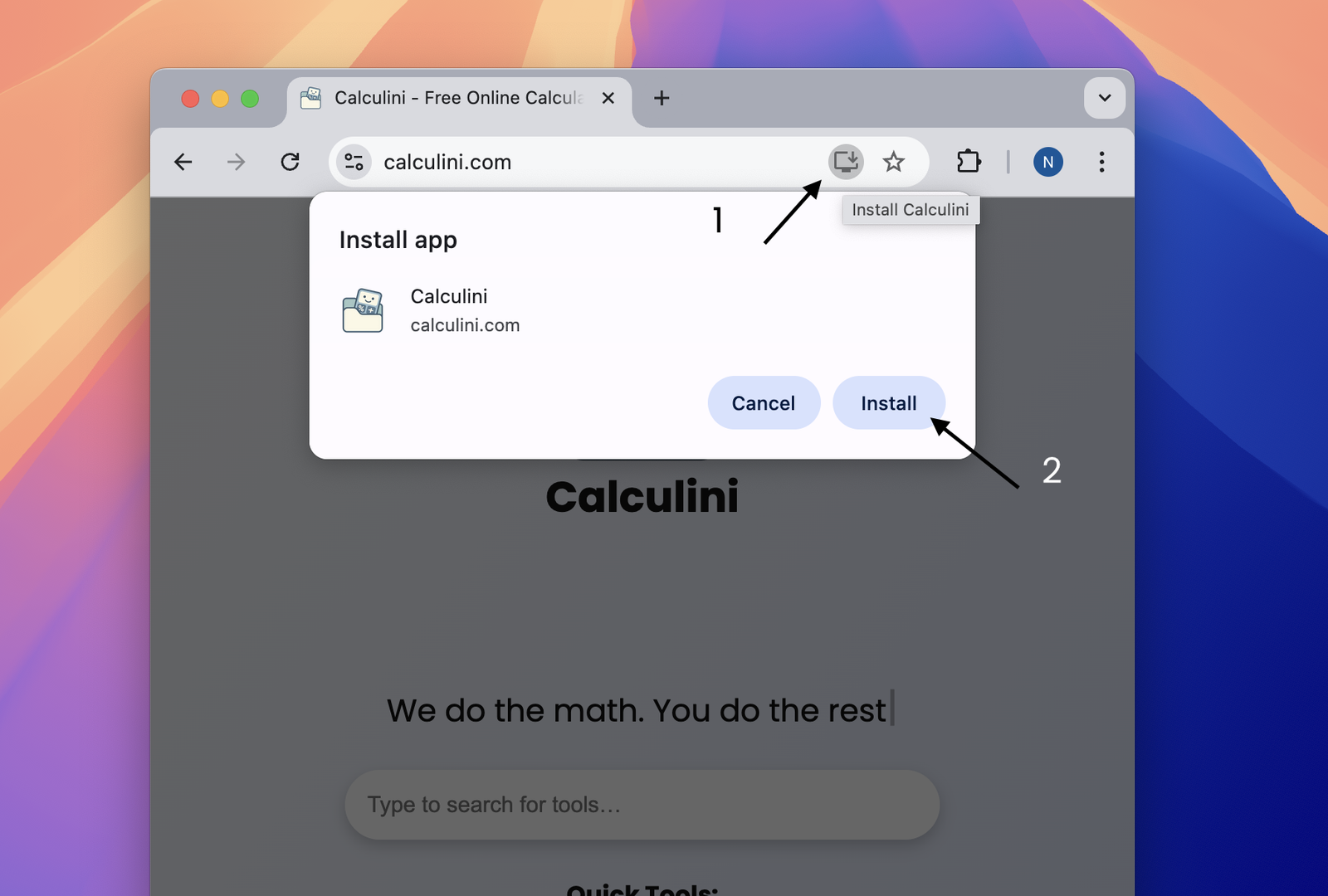
When you visit calculini.com using Google Chrome or Microsoft Edge, look for the “Install Calculini” button in the address bar.
Click it to pin Calculini to your Dock (on Mac) or Taskbar (on Windows) for one-click access.
📱 On iPhone or iPad (Safari)
1. Open Calculini in Safari
2. Tap the Share icon (bottom toolbar)
3. Scroll down and tap Add to Home Screen
4. Done! Calculini is now on your home screen like a native app
🤖 On Android (Chrome)
1. Open Calculini in Chrome
2. Tap the three-dot menu (top right)
3. Select Add to Home screen or Install App
4. That’s it! It launches full-screen, just like a regular app
⚡ Why install it?
• One-tap access, no typing
• Works full-screen with no browser clutter
• Fast, light, and reliable on all devices
📲 Try it out and make Calculini even easier to use wherever you are.
If you’ve installed it already, tell us what you think below!
